> For the complete documentation index, see [llms.txt](https://tuonioooo-notebook.gitbook.io/micro-services-subject/llms.txt). Markdown versions of documentation pages are available by appending `.md` to page URLs; this page is available as [Markdown](https://tuonioooo-notebook.gitbook.io/micro-services-subject/dockershi-zhan-pian/da-jian-docker-si-you-cang-ku.md).
# 搭建docker私有仓库
## 搭建docker私有仓库
### **环境准备**
环境:两个装有Docker 17.09.0-ce 的centos7虚拟机\
虚拟机一:192.168.0.154 用户开发机\
虚拟机二:192.168.0.153 用作私有仓库
### **搭建私有仓库**
\
在153机器上下载registry镜像
```
docker pull registry
```
下载完之后我们通过该镜像启动一个容器
```
docker run -d -p 5000:5000 registry
```
默认情况下,会将仓库存放于容器内的/tmp/registry目录下,这样如果容器被删除,则存放于容器中的镜像也会丢失,所以我们一般情况下会指定本地一个目录挂载到容器内的/tmp/registry下,
不过具体的情况还是要到容器里去看
先启动容器
```
docker run -d -p 5000:5000 -v /opt/data/registry:/tmp/registry registry
b4c21ca8cf8a23ea72e0471909742541ffc312ea5cf492486b5bdc3130179864
```
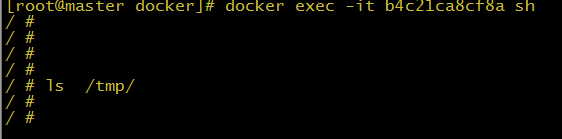
可以看到容器存放位置不在/tmp 下
我们接着来查找下,挂载位置到底在哪里
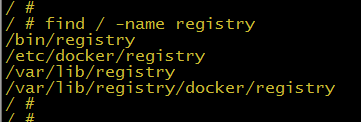
可以看到registry 挂载目录是 在 /var/lib/registry 下
我们重新启动下 registry
```
docker run -d -p 5000:5000 -v /opt/data/registry:/var/lib/registry -v /data/config.yml:/etc/docker/registry/config.yml registry
```
/data/config.yml 这个是什么呢?我们在下面删除仓库镜像介绍
这里需要说明一点,在启动仓库时,需在配置文件中的storage配置中增加delete=true配置项,允许删除镜像。默认的镜像是没有这个参数
```
cat config.yml
version: 0.1
log:
fields:
service: registry
storage:
delete:
enabled: true
cache:
blobdescriptor: inmemory
filesystem:
rootdirectory: /var/lib/registry
http:
addr: :5000
headers:
X-Content-Type-Options: [nosniff]
health:
storagedriver:
enabled: true
interval: 10s
threshold: 3
```
可以看到我们启动了一个容器,地址为:192.168.0.153:5000。
## **测试**
接下来我们就要操作把一个本地镜像push到私有仓库中。首先在153机器下pull一个比较小的镜像来测试(此处使用的是busybox)。
```
docker pull busybox
```
接下来修改一下该镜像的tag。
```
docker tag busybox 192.168.0.153:5000/busybox
```
接下来把打了tag的镜像上传到私有仓库。
```
docker push 192.168.0.153:5000/busybox
```
可以看到 push 失败:
```
Error: Invalid registry endpoint https://192.168.0.153:5000/v1/: Get https://192.168.0.153:5000/v1/_ping: dial tcp 192.168.0.153:5000: connection refused. If this private registry supports only HTTP or HTTPS with an unknown CA certificate, please add `--insecure-registry 192.168.112.136:5000` to the daemon's arguments. In the case of HTTPS, if you have access to the registry's CA certificate, no need for the flag; simply place the CA certificate at /etc/docker/certs.d/192.168.0.153:5000/ca.crt
```
因为Docker从1.3.X之后,与docker registry交互默认使用的是https,然而此处搭建的私有仓库只提供http服务,所以当与私有仓库交互时就会报上面的错误。为了解决这个问题需要在启动docker server时增加启动参数为默认使用http访问。修改docker启动配置文件:
```
vim /usr/lib/systemd/system/docker.service
```
找到 ExecStart
```
ExecStart=/usr/bin/dockerd --insecure-registry 192.168.0.153:5000
```
红色字体为添加的
**重启docker:**
```
systemctl daemon-reload
systemctl restart docker
```
重启完之后我们再次运行推送命令,把本地镜像推送到私有服务器上。
```
docker push 192.168.0.153:5000/busybox
```
接下来我们从私有仓库中pull下来该镜像。
```
sudo docker pull 192.168.0.153:5000/busybox
```
**查看镜像**
```
# curl -XGET http://registry:5000/v2/_catalog
# curl -XGET http://registry:5000/v2/image_name/tags/list
```
## Registry删除镜像、垃圾回收
Docker仓库在2.1版本中支持了删除镜像的API,但这个删除操作只会删除镜像元数据,不会删除层数据。在2.4版本中对这一问题进行了解决,增加了一个垃圾回收命令,删除未被引用的层数据
**打包上传镜像**
```
[root@master scripts]# docker tag alpine:v1 192.168.0.153:5000/fbgweb:v1
[root@master scripts]# docker push 192.168.0.153:5000/fbgweb:v1
The push refers to a repository [192.168.0.153:5000/fbgweb]
e30c8796115a: Pushed
9922d8737f34: Pushed
c3cc0aba53da: Pushed
f73b42f6c905: Pushed
4a3fe911d00f: Pushed
187a385eda60: Pushed
0e23c00d0c30: Pushed
d221a7f5318b: Pushed
7e2d3752fd4f: Pushed
v1: digest: sha256:6a67ba482a8dd4f8143ac96b1dcffa5e45af95b8d3e37aeba72401a5afd7ab8e size: 2204
```
查看仓库镜像 (查看仓库镜像[脚本 get.py](http://www.cnblogs.com/Tempted/p/7768564.html))
```
[root@master scripts]# python get.py
192.168.0.153:5000/fbgweb:v1
192.168.0.153:5000/nginx:1.7.9
192.168.0.153:5000/nginx:1.8
```
**查看数据进行仓库容器中,通过du命令查看大小**
```
[root@master ~]# docker exec -it f70d0c79e6d546d4 sh
~ # du -chs /var/lib/registry/
182.4M /var/lib/registry/
182.4M total
```
**删除镜像**
删除镜像对应的API如下:
```
DELETE /v2//manifests/
```
name:镜像名称
reference: 镜像对应sha256值
发送请求,删除刚才上传的镜像
```
[root@master scripts]# curl -I -X DELETE http://192.168.0.153:5000/v2/fbgweb/manifests/sha256:6a67ba482a8dd4f8143ac96b1dcffa5e45af95b8d3e37aeba72401a5afd7ab8e
HTTP/1.1 202 Accepted
Docker-Distribution-Api-Version: registry/2.0
X-Content-Type-Options: nosniff
Date: Mon, 13 Nov 2017 13:04:24 GMT
Content-Length: 0
Content-Type: text/plain; charset=utf-8
```
查看镜像
```
[root@master scripts]# python get.py
192.168.0.153:5000/nginx:1.7.9
192.168.0.153:5000/nginx:1.8
192.168.0.153:5000/nginx:latest
```
可以看到镜像索引已经被删除
查看数据大小
```
[root@master ~]# docker exec -it f70d0c79e6d546d4 sh
~ # du -chs /var/lib/registry/
182.4M /var/lib/registry/
182.4M total
```
可以看到数据大小没有变化(只删除了元数据)
**垃圾回收**
进行容器执行垃圾回收命令
```
~ # registry garbage-collect /etc/docker/registry/config.yml
blobs marked, 5 blobs eligible for deletion
blob eligible for deletion: sha256:5e7cf06c8745d0985f94191c60aad8b87371c8a674162525bff0efccdb805931
INFO[0000] Deleting blob: /docker/registry/v2/blobs/sha256/5e/5e7cf06c8745d0985f94191c60aad8b87371c8a674162525bff0efccdb805931 go.version=go1.7.6 instance.id=c38f4c35-9914-4b77-a59f-ea584137fae0
blob eligible for deletion: sha256:6a67ba482a8dd4f8143ac96b1dcffa5e45af95b8d3e37aeba72401a5afd7ab8e
INFO[0000] Deleting blob: /docker/registry/v2/blobs/sha256/6a/6a67ba482a8dd4f8143ac96b1dcffa5e45af95b8d3e37aeba72401a5afd7ab8e go.version=go1.7.6 instance.id=c38f4c35-9914-4b77-a59f-ea584137fae0
blob eligible for deletion: sha256:966e2fb5980b2a854c03551418af0b2ee2bef082dfaae075026d00fa36620960
INFO[0000] Deleting blob: /docker/registry/v2/blobs/sha256/96/966e2fb5980b2a854c03551418af0b2ee2bef082dfaae075026d00fa36620960 go.version=go1.7.6 instance.id=c38f4c35-9914-4b77-a59f-ea584137fae0
blob eligible for deletion: sha256:a122ad1ef7a033582abfc7bae980cc11bdcc2d19bed7d8ea5b7efc50d16456c8
INFO[0000] Deleting blob: /docker/registry/v2/blobs/sha256/a1/a122ad1ef7a033582abfc7bae980cc11bdcc2d19bed7d8ea5b7efc50d16456c8 go.version=go1.7.6 instance.id=c38f4c35-9914-4b77-a59f-ea584137fae0
blob eligible for deletion: sha256:b29205236f1d3eb6143e95f3a412a8f21a16a10b09c7aee28ecba3d803832285
INFO[0000] Deleting blob: /docker/registry/v2/blobs/sha256/b2/b29205236f1d3eb6143e95f3a412a8f21a16a10b09c7aee28ecba3d803832285 go.version=go1.7.6 instance.id=c38f4c35-9914-4b77-a59f-ea584137fae0
```
查看数据大小
```
~ # du -chs /var/lib/registry/
159.5M /var/lib/registry/
159.5M total
```
可以看到镜像数据已被删除
### 参考
---
# Agent Instructions
This documentation is published with GitBook. GitBook is the documentation platform designed so that both humans and AI agents can read, navigate, and reason over technical content effectively. Learn more at gitbook.com.
## Querying This Documentation
If you need additional information that is not directly available in this page, you can query the documentation dynamically by asking a question.
Perform an HTTP GET request on the current page URL with the `ask` query parameter:
```
GET https://tuonioooo-notebook.gitbook.io/micro-services-subject/dockershi-zhan-pian/da-jian-docker-si-you-cang-ku.md?ask=
```
The question should be specific, self-contained, and written in natural language.
The response will contain a direct answer to the question and relevant excerpts and sources from the documentation.
Use this mechanism when the answer is not explicitly present in the current page, you need clarification or additional context, or you want to retrieve related documentation sections.